Prepare product materials
LeoNot set
Tabple
Turn the decisions in your docs into tasks, and keep chat and schedules in step with your team inside the project.
No card required · Works in your browser
Read the proposal and refine the copy for the first screen.
Open the documents and conversations linked to this task.
Try Tabple
Move a task, edit a document, and choose a date. The examples below share one project.
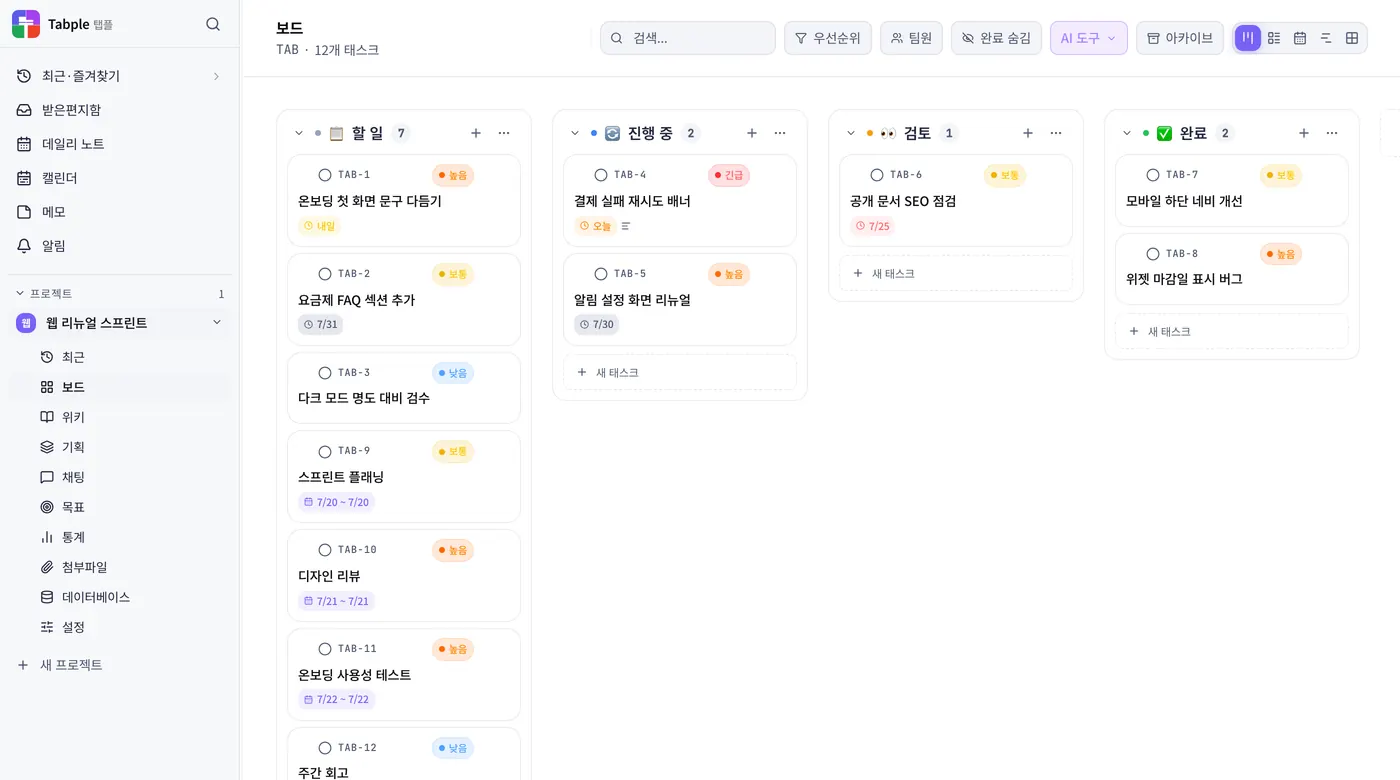
Assign tasks and deadlines, then move work between stages. Switch between a board and a list.
Add a task or change its status below the card.
Read the guideOrganize meeting notes and plans in your document library. See the progress of linked tasks alongside them.
Try editing the document. Change its title to update the shared link in the chat below.
Read the guideLinked task
See deadlines and recurring events on your calendar. Choose daily, weekly, or monthly views.
Pick a day to change the first task's deadline.
Read the guideRefine the opening copy9/16
Discuss work in project channels and share documents and tasks. Use replies and mentions to keep teammates informed.
Try adding a message, then follow the shared document link.
Read the guideTasks, documents, schedules and conversations. Explore the tools through real product screens.
Turn what you decide in chat into a task, and it lands on the board as a card. See progress, owners and due dates together to decide what to focus on.
Stop asking “why did we decide that?” Write down what was decided and why, right in the project. Meeting notes, ideas and reference material stay where you can find them again.
Before you take next week off, check what’s due that week. Personal events and project deadlines share one calendar, with daily, weekly and monthly views.
Start the conversation where the work is, without explaining which project you mean. Direct messages and project rooms sit side by side.
Bring briefs, requirements and user flows into the same space. Develop your ideas and connect them to actionable tasks.
Desktop & mobile apps
Desktop apps for macOS, Windows, and Linux, mobile apps for iPhone, iPad, and Android, and a web app in any browser — pick up wherever you left off. Anything you edit offline syncs the moment you reconnect.
MCP · Model Context Protocol
Connect once and Claude Code, Cursor, and VS Code can search your Tabple docs, tasks, and feature specs — and create new pages or tasks.
›Pull together this week's tasks and make me a retro page
Found 7 done · 2 in progress
I collected the 7 items you finished this week into a retro page.
get_tasks · create_task · create_pageclaude mcp add --transport http tabple \
https://tabple.com/api/mcp \
--header "Authorization: Bearer <YOUR_TOKEN>"Paste your issued token where <YOUR_TOKEN> is
Learn about AI toolsYes. Create an account without a payment card and start on the Free plan. See the pricing page for current prices and what each plan includes.
Yes. Start with personal notes and tasks, then invite people to a project. Project collaboration and organization-level team and seat management are separate; check the pricing page for the scope you need.
Offline wiki editing is supported, with changes synced when you reconnect. Features that communicate with the server, such as chat and AI integration, need an internet connection. Offline support can vary by app and feature.
Use a browser, the macOS, Windows or Linux desktop apps, or the iPhone, iPad and Android apps. Chrome and Whale also have extensions that sit in the sidebar. See the download page for installation instructions and device-specific requirements.
One note, one small task. Start using Tabple in the way that works for you.

